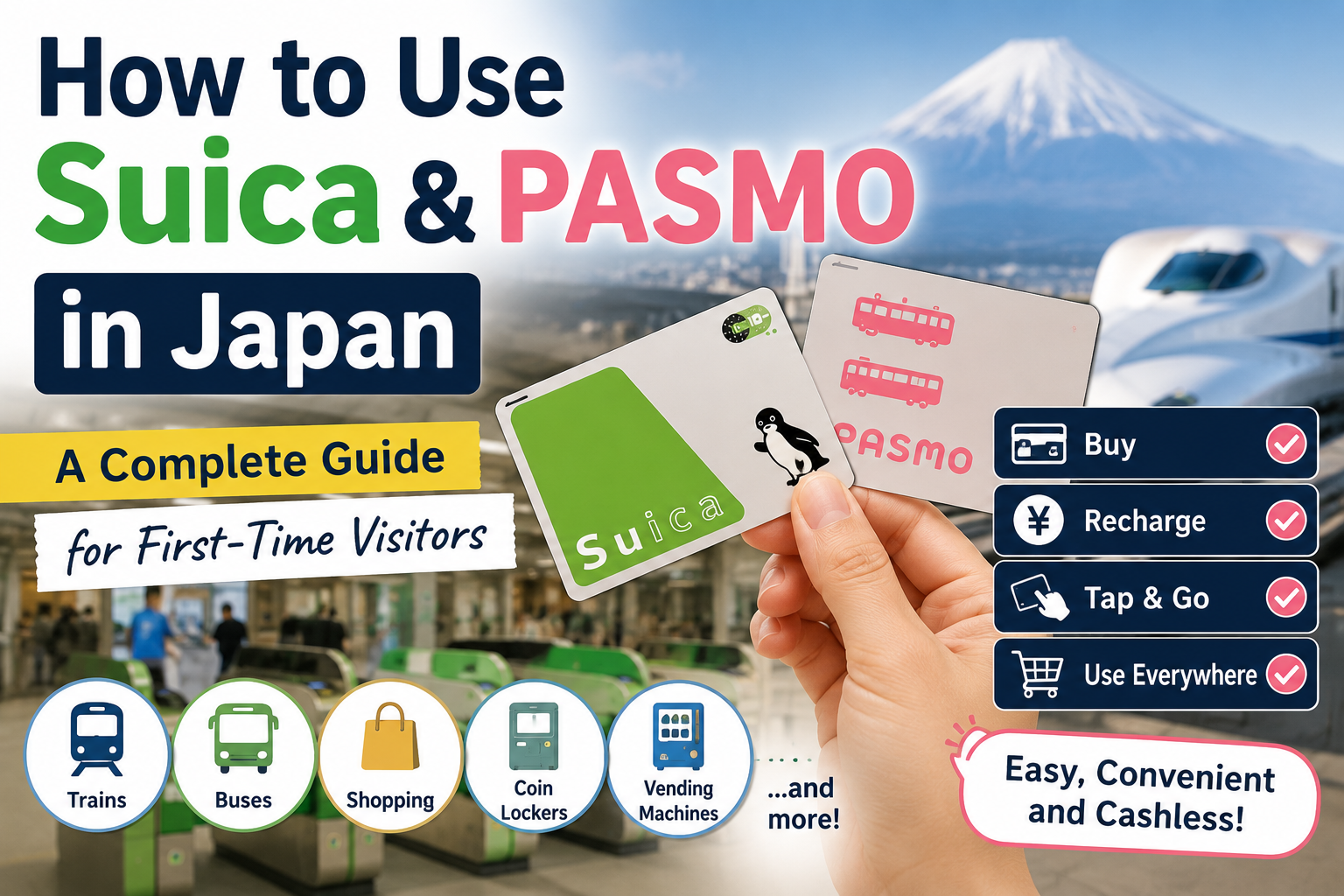
A Complete Guide for First-Time Visitors
Japan’s train system may look complicated, but paying for transportation can be surprisingly simple.
Instead of buying a paper ticket every time you travel, you can use a prepaid transportation IC card such as Suica or PASMO.
Just tap the card at the ticket gate when you enter a station and tap it again when you leave.
The correct fare is calculated and deducted automatically.
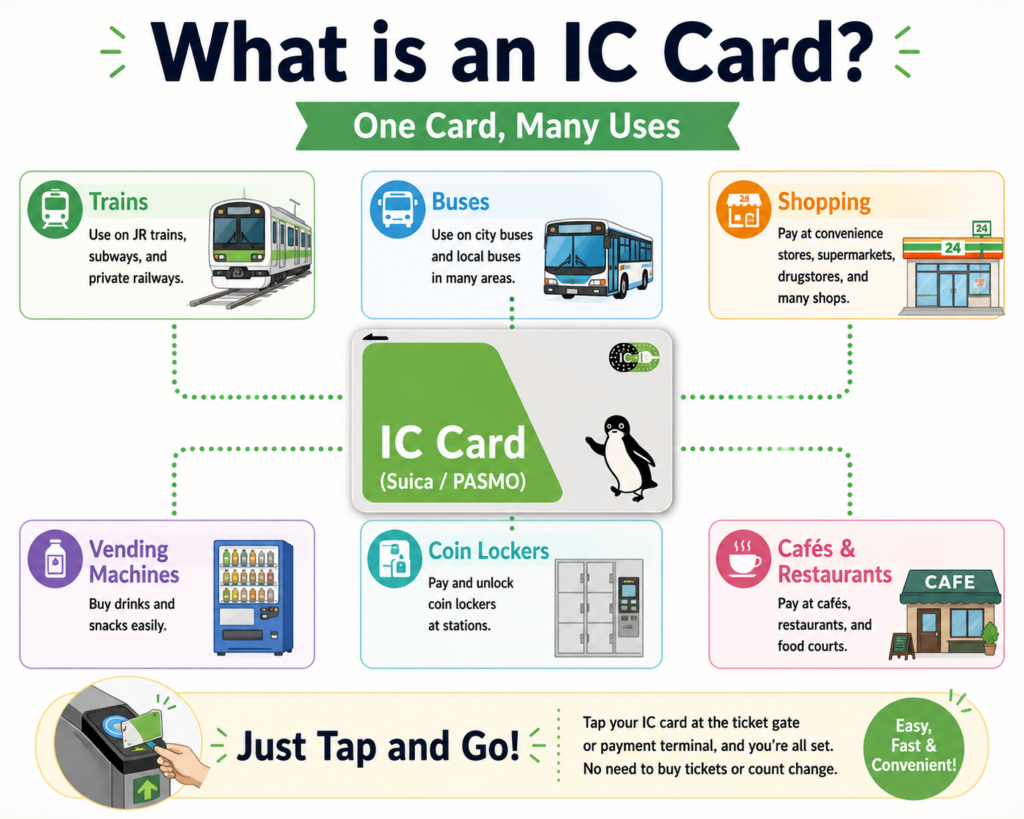
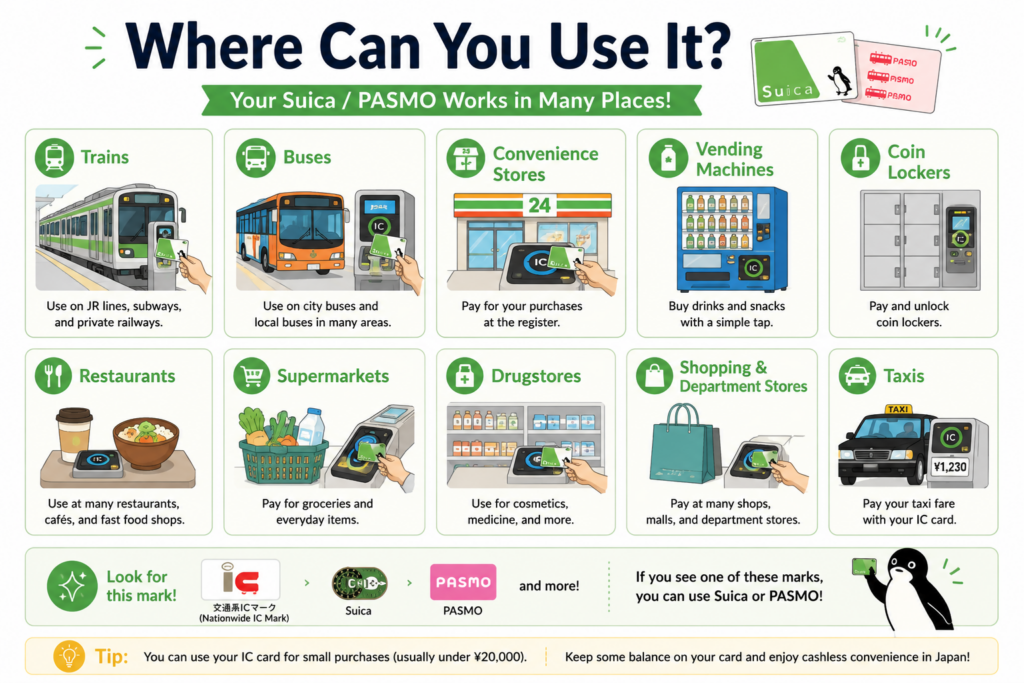
You can also use Suica and PASMO for much more than trains. They are accepted at many buses, convenience stores, vending machines, restaurants, coin lockers and other participating businesses.
This guide explains:
- What Suica and PASMO are
- The difference between them
- Which card visitors should choose
- How to buy and recharge a card
- How to use it on trains and buses
- Where you can use it for shopping
- How mobile IC cards work
- Common mistakes and limitations
Quick Answer: Which Card Should You Choose?
For most visitors, Suica and PASMO work almost identically.
Choose whichever is easiest to obtain.
Suica
Originally issued by JR East.
It is especially common at JR stations in the Tokyo area.
PASMO
Originally associated with private railways, subways and buses in the Tokyo area.
It is commonly found at subway and private-railway stations.
Welcome Suica
A visitor-oriented physical Suica card that:
- Requires no ¥500 deposit
- Is valid for 28 days
- Can be used for transportation and shopping
- Is designed for temporary visitors
JR East states that Welcome Suica can be used for 28 days from the purchase date and does not require a deposit.
Welcome Suica Mobile
An iPhone-based service for overseas visitors that:
- Can be issued through an iOS app
- Can be recharged using an eligible payment card in Apple Pay
- Is valid for 180 days after issuance
- Can be used for trains, buses and shopping
Availability of issuance and recharging may depend on the laws and payment conditions of the user’s country.
TOURIST PASMO
A new visitor card introduced in 2026.
It is:
- Available mainly to short-term international visitors
- Valid for 28 days
- Sold without a deposit
- Available at selected locations at Narita and Haneda airports
- Not refundable, including any unused balance
TOURIST PASMO launched from May 2026 and can be used on compatible trains, buses and at participating stores across Japan.
The simplest recommendation
iPhone user: Consider Welcome Suica Mobile.
Prefer a physical card: Buy Welcome Suica or TOURIST PASMO where available.
Staying longer or returning to Japan: A regular Suica or PASMO may be more suitable.
What Is an IC Card?
An IC card is a rechargeable prepaid card used for transportation and small cashless payments.
“IC” stands for integrated circuit.
The card contains a chip that communicates with the reader when you tap it.
You do not need to:
- Insert the card
- Swipe it
- Choose your destination
- Calculate the fare
- Buy a new ticket for every journey
You simply:
- Add money to the card.
- Tap it when entering.
- Travel to your destination.
- Tap it again when leaving.
- Let the system deduct the correct fare.
What Is Suica?
Suica is a prepaid transportation and electronic-money card issued within the JR East network.
It can be used for:
- JR trains
- Subways
- Private railways
- Buses
- Convenience stores
- Restaurants
- Vending machines
- Shopping malls
- Coin lockers
- Other participating services
JR East states that a charged Suica can be used at convenience stores, restaurants, shopping malls and other businesses displaying participating IC-card logos.
The name is often associated with JR East’s green penguin design, although card designs vary.
What Is PASMO?
PASMO is another prepaid transportation IC card.
It is commonly associated with:
- Tokyo Metro
- Toei Subway
- Private railways
- Bus operators
- Other participating transportation networks
PASMO can be used on compatible transportation systems and for shopping at participating businesses, much like Suica.
For ordinary travel, the practical difference between Suica and PASMO is very small.
Suica vs PASMO: What Is the Difference?
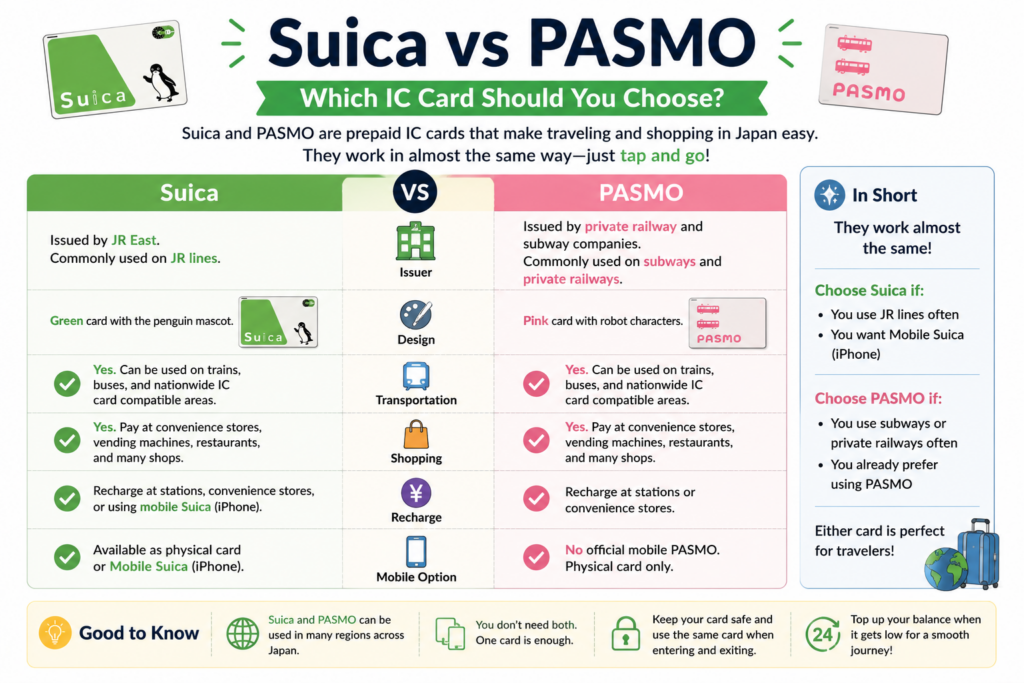
The main difference is the issuing organization.
| Feature | Suica | PASMO |
|---|---|---|
| Main association | JR East | Private railways, subways and buses |
| Common color | Green | Pink |
| Trains and buses | Yes | Yes |
| Shopping | Yes | Yes |
| Nationwide mutual-use areas | Broadly supported | Broadly supported |
| Tap-in and tap-out process | Same | Same |
| Fare calculation | Automatic | Automatic |
| Best choice for visitors | Whichever is easier to obtain | Whichever is easier to obtain |
For most visitors:
There is no meaningful reason to prefer one over the other based solely on usability.
You do not need to buy both.
Can Suica and PASMO Be Used Across Japan?
Suica and PASMO participate in Japan’s nationwide IC-card interoperability network.
This means they can be used in many regions that accept major transportation IC cards, including areas associated with:
- ICOCA
- TOICA
- Kitaca
- manaca
- SUGOCA
- nimoca
- Hayakaken
Welcome Suica can also be used nationwide at participating trains, buses, stores and vending machines displaying compatible IC-card marks.
However, there is an important limitation.
You Cannot Always Travel Continuously Between IC-Card Areas
An IC card may work in both the Tokyo and Sendai areas, for example, but that does not mean you can begin a normal IC-card journey in Tokyo and simply tap out in Sendai.
JR East states that Suica cannot be used for continuous travel between separate applicable areas. Travelers crossing those boundaries may need to purchase a ticket in advance.
For long-distance intercity journeys, check whether you need:
- A paper ticket
- A limited-express ticket
- A Shinkansen reservation
- A separate online booking
Which Suica or PASMO Should Visitors Buy?
There are several options.
Regular Suica
A standard rechargeable Suica.
It is useful for:
- Longer stays
- Repeat visits
- People who want a long-validity card
- Travelers who may want to return the card for a refund
A regular Suica generally includes a ¥500 deposit.
When returned to the appropriate JR East location, the deposit and remaining balance may be refunded, minus a handling fee deducted from the balance.
Regular PASMO
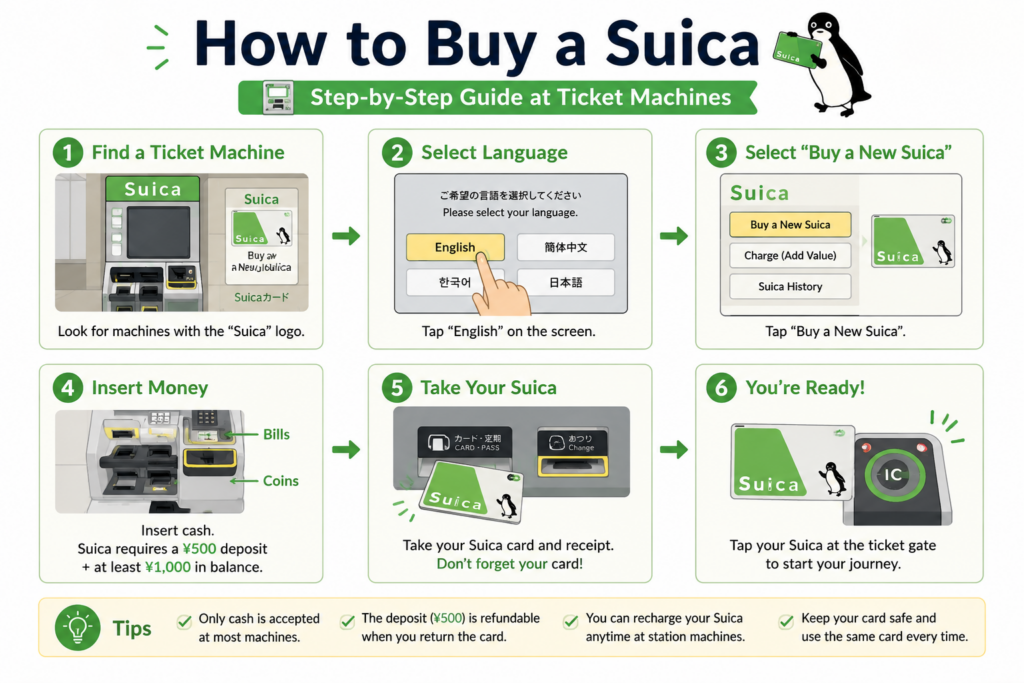
A standard PASMO can be purchased at participating ticket machines or ticket counters.
The official PASMO guide states that a new regular PASMO includes a ¥500 deposit and that credit cards are not accepted for the ordinary purchase procedure described on its visitor page.
Welcome Suica
This is designed for temporary visitors.
It has:
- No deposit
- A 28-day validity period
- Transportation and shopping functions
- No need to return the card for a deposit
It is convenient for shorter trips but becomes unusable after its validity period.
Welcome Suica Mobile
This may be the easiest option for compatible iPhone users.
It lets visitors:
- Issue Suica digitally
- Recharge through the app
- Check the balance
- Use Apple Wallet
- Tap at ticket gates
- Pay at participating stores
It is valid for 180 days after issuance.
TOURIST PASMO
TOURIST PASMO is a physical visitor card available from selected airport-area locations.
According to PASMO’s April 2026 announcement:
- It is valid for 28 days.
- It has no deposit.
- Unused funds cannot be refunded.
- It is sold at selected locations at Narita and Haneda airports.
- Narita sales start at ¥2,000, including ¥2,000 in usable value.
- Haneda offers several denominations.
Where Can You Buy Suica or PASMO?
Availability depends on the card type.
Regular Cards
Regular Suica or PASMO cards may be available at:
- Participating railway ticket machines
- Station ticket counters
- JR service centers
- Subway or private-railway counters
For PASMO, ticket-machine instructions typically include:
- Select PASMO.
- Select Purchase New PASMO.
- Choose a blank or personalized card.
- Follow the instructions.
- Pay the required amount.
Actual menus may vary by station and operator.
Visitor Cards
Welcome Suica and TOURIST PASMO availability is more limited.
Look at:
- Haneda Airport
- Narita Airport
- Selected JR East Travel Service Centers
- Participating airport railway stations
- Designated ticket machines or counters
Because availability and sales locations can change, check official information shortly before your trip.
How Much Does an IC Card Cost?
The amount depends on the type of card.
Regular Suica or PASMO
The initial payment generally consists of:
- A ¥500 refundable deposit
- A prepaid balance for transportation and shopping
The ¥500 deposit cannot be used to pay fares or purchases.
Welcome Suica
There is no ¥500 deposit.
The amount you pay becomes usable value, subject to the product’s terms and validity period.
TOURIST PASMO
There is no deposit.
The entire purchase amount is loaded as usable value, but unused funds cannot be refunded.
How to Use Suica or PASMO on Trains
The basic process is extremely simple.
Step 1: Enter the Station
Find an automatic ticket gate displaying an IC-card reader.
Step 2: Tap Your Card
Touch the card flat against the reader.
Do not wave it quickly.
Hold it close until you hear a beep and see the gate open.
Step 3: Keep the Same Card
Use the same physical card, phone or watch throughout the journey.
Step 4: Travel to Your Destination
Transfer normally by following station signs.
Step 5: Tap Out
At the destination, tap the same card or device at the exit gate.
The system calculates and deducts the fare automatically.
Step 6: Check the Display
The gate may briefly show:
- The fare deducted
- Your remaining balance
Never Use Different Cards to Enter and Exit
One common mistake is entering with one card and trying to exit with another.
For example:
- Entering with physical Suica
- Exiting with Mobile Suica
The system treats these as different cards.
Always use the exact same:
- Physical card
- iPhone
- Apple Watch
for both entry and exit.
How to Use an IC Card on Buses
Bus procedures vary by region.
You may need to:
- Tap when boarding and again when leaving
- Tap only when leaving
- Board from the rear and exit from the front
- Board from the front and exit from the rear
In many distance-based fare systems:
- Tap when boarding.
- Ride to your stop.
- Tap again when leaving.
- The fare is deducted automatically.
Welcome Suica guidance confirms that on compatible buses users tap the sensor when boarding and leaving.
Watch what local passengers do and check the signs near the doors.
How to Recharge Suica or PASMO
“Recharge” is sometimes shown as:
- Charge
- Top Up
- チャージ
You can usually recharge a physical card at:
- Train-station ticket machines
- Fare-adjustment machines
- Convenience stores
- Selected station counters
Recharging at a Ticket Machine
A typical process is:
- Insert or place the IC card as instructed.
- Select Charge.
- Choose an amount.
- Insert cash.
- Wait for the recharge to complete.
- Take your card and receipt.
JR East’s official recharge instructions describe inserting the Suica, selecting “Charge,” choosing an amount and inserting cash.
Recharging at a Convenience Store
Tell the cashier:
Suica charge, please.
or:
Suica ni chāji onegaishimasu.
You will usually:
- State the amount.
- Pay cash.
- Tap or place your card on the reader.
- Wait for confirmation.
Important: Carry Some Cash
Physical IC-card recharging frequently requires Japanese cash.
Do not rely entirely on foreign credit cards for topping up a physical card.
How Much Should You Recharge?
Avoid loading too much money at once, particularly onto a visitor card whose balance cannot be refunded.
A practical approach is:
- Initial charge: ¥2,000–¥5,000
- Recharge when the balance falls below ¥1,000
- Add more before a long travel day
For short trips around a city, several thousand yen may last for multiple journeys and small purchases.
Your actual usage depends on:
- Travel distance
- Number of journeys
- Bus use
- Shopping
- Vending-machine purchases
How to Check Your Balance
You can check your balance:
- At a ticket gate
- At a ticket machine
- At a fare-adjustment machine
- On some shop terminals
- In Apple Wallet for mobile cards
- In the relevant mobile application
Apple states that users can view a supported Japanese transit-card balance directly in the Wallet app on an iPhone or Apple Watch.
What Happens If Your Balance Is Too Low?
If your balance is insufficient when exiting a station, the gate may close and display an error.
Do not panic.
Go to:
- A fare-adjustment machine
- The station office
- A nearby charging machine
Then:
- Recharge the card.
- Pay the fare difference if required.
- Try the gate again.
Station staff handle this situation regularly.
Where Can You Use Suica and PASMO for Shopping?
Look for:
- Suica logo
- PASMO logo
- IC symbol
- Nationwide mutual-use IC-card mark
- 交通系IC
Common places include:
- Convenience stores
- Vending machines
- Station shops
- Restaurants
- Cafés
- Supermarkets
- Drugstores
- Shopping malls
- Taxis
- Coin lockers
- Tourist attractions
JR East lists convenience stores, restaurants, shopping malls and participating station shops among the places where Suica can be used.
How to Pay with Suica or PASMO in a Store
At a staffed register, say:
Suica de onegaishimasu.
or:
PASMO de onegaishimasu.
This means:
“Suica, please.”
The cashier will activate the appropriate payment mode.
Then:
- Check the amount.
- Place the card or phone on the reader.
- Wait for the confirmation sound.
- Check that payment is complete.
At self-checkout, choose:
- IC Card
- Transportation IC
- Electronic Money
- 交通系IC
Do not select Credit Card merely because you are tapping.
An IC-card payment is processed differently from a contactless credit-card payment.
Can You Split a Payment Between IC Card and Cash?
Do not assume that split payment is available.
Some stores may permit limited combinations, but many do not allow:
- Partial IC-card balance plus credit card
- Two IC cards
- IC card plus another electronic wallet
Welcome Suica’s official coin-locker guidance, for example, states that payment cannot be divided between the card and cash.
Keep enough balance available or be prepared to use another payment method for the entire purchase.
How to Use Suica with a Coin Locker
At compatible coin lockers, an IC card may serve as both:
- The payment method
- The electronic key
A typical process is:
- Put your luggage in the locker.
- Close the door.
- Select IC-card payment.
- Tap your Suica or PASMO.
- Take the receipt.
- Return later.
- Select the option to retrieve your luggage.
- Tap the same card again.
- Open the locker.
The receipt may contain the locker location and contact information, so keep it. JR East provides this same basic process for compatible Welcome Suica lockers.
Never use a different card or phone when returning to the locker.
Can Suica or PASMO Be Used on the Shinkansen?
A basic IC-card balance does not automatically function as a normal Shinkansen ticket on every route.
You may need:
- A Shinkansen ticket
- A reserved-seat ticket
- An online reservation linked to your IC card
- Registration for a specific touch-to-ride service
Welcome Suica Mobile supports certain JR East Shinkansen services and reservations, but route and service conditions apply.
For a first-time visitor, the safest assumption is:
Buy or reserve the required Shinkansen ticket unless your booking service explicitly says your IC card is linked and ready to use.
Can You Use Suica or PASMO for Limited Express Trains?
The IC card may cover the basic fare, but some trains require an additional ticket.
Examples include:
- Limited Express
- Reserved-seat services
- Green Cars
- Airport express trains
- Shinkansen
JR East states that limited express, express and Green Car travel may require a separate ticket in advance.
Do not assume that tapping through the gate covers every charge.
Mobile Suica and PASMO on iPhone
Compatible transit cards can be added to Apple Wallet and used on an iPhone or Apple Watch.
Apple currently supports Suica, PASMO, ICOCA and TOICA in Wallet for transportation and participating store purchases in Japan.
Basic Requirements
Apple lists:
- An Apple Account with two-factor authentication
- A compatible iPhone or Apple Watch
- A supported version of iOS or watchOS
Current compatibility generally includes iPhone 8 or later and Apple Watch Series 3 or later, with limited earlier-device exceptions.
How to Use It
With Express Mode enabled:
- Hold the top of the iPhone or the Apple Watch near the ticket-gate reader.
- Wait for the confirmation.
- Use the same device when leaving.
The phone does not normally need to be unlocked or connected to mobile data or Wi-Fi for ordinary Express Mode transit use.
Do Not Switch Between iPhone and Apple Watch Mid-Journey
A card on your iPhone and a card on your Apple Watch are treated as separate payment instruments.
Enter and exit with the same device.
What About Android Phones?
Mobile IC-card compatibility on Android varies significantly by:
- Device model
- Region
- Hardware support
- Operating system
- Where the phone was sold
Many overseas Android devices do not support the required Japanese mobile-transit functionality.
For international Android users, a physical card is generally the safer option unless the device manufacturer and the relevant IC-card operator explicitly confirm compatibility.
Physical Card vs Mobile Card
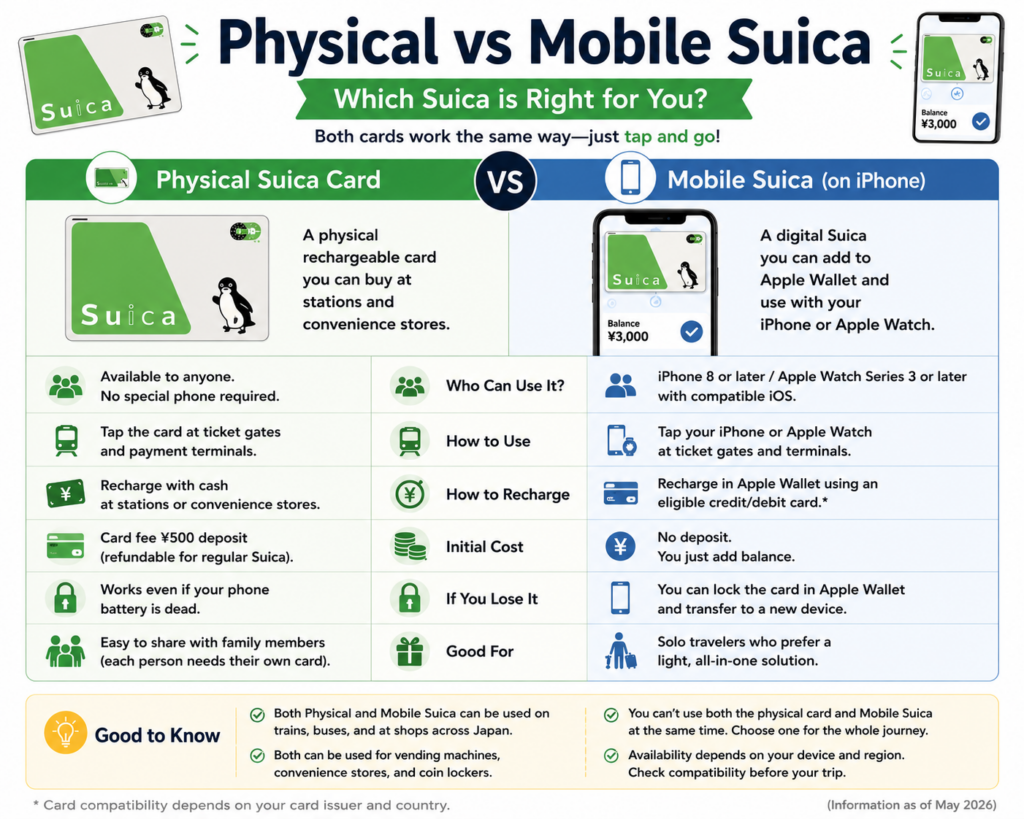
| Feature | Physical card | Mobile card |
|---|---|---|
| Requires compatible phone | No | Yes |
| Works if phone battery fails | Yes | Depends on device |
| Recharge at station machines | Yes | Mobile recharge often available |
| Easy for children | Often yes | Depends on device and account |
| Balance visible at all times | No | Yes |
| Risk | Losing the card | Phone loss or battery issues |
| Best for | Simplicity and broad accessibility | Compatible iPhone users |
A physical card remains the most straightforward choice for many families and first-time visitors.
What Happens If You Lose the Card?
The outcome depends on the card type.
Unregistered Physical Card
A blank, anonymous card may not be replaceable if lost.
JR East states that lost regular unregistered Suica cards cannot be reissued.
Personalized Card
A personalized card may be eligible for reissue after identity verification.
PASMO notes that personalized PASMO cards can be reissued if lost because personal information is registered.
Visitor Card
Welcome Suica and TOURIST PASMO have special conditions and generally should be treated like cash.
Mobile Card
Mobile cards may offer account-based recovery options, depending on:
- Registration status
- Device
- Apple Account
- Card operator
- Mobile service terms
Can You Get a Refund?
Regular Suica
A regular JR East-issued Suica may be returned at eligible JR East locations.
JR East states that:
- The ¥500 deposit is refunded.
- Remaining balance is refunded after a ¥220 handling fee is deducted.
- Cards issued by other companies must be returned to the relevant issuer.
Regular PASMO
The ¥500 deposit is refundable when an eligible regular PASMO is returned, subject to the applicable PASMO procedures.
TOURIST PASMO
No refunds are available, including unused stored value.
Visitor Cards Generally
Because short-term visitor products can have fixed validity and refund restrictions, avoid leaving a large balance on them near the end of your trip.
Use the remaining value for:
- Airport transportation
- Convenience-store purchases
- Drinks
- Snacks
- Souvenirs
- Vending machines
Common Problems and How to Fix Them
The Ticket Gate Turns Red
Possible reasons include:
- Insufficient balance
- Incomplete previous journey
- Wrong card used
- Card read error
- Unsupported route
- Entering and exiting at the same station unusually
Move aside and ask station staff for help.
You Forgot to Tap Out
Visit a station office before the next journey.
Staff may need to correct the travel record.
You Used the Wrong Card
Explain which card you used to enter.
Do not repeatedly tap multiple cards because this can create more confusing records.
The Card Does Not Work in Another Region
You may be crossing between separate IC-card service areas.
Ask staff whether you need a paper ticket or fare adjustment.
Your Mobile Card Does Not Respond
Check:
- The correct card is in Express Mode
- You are using the same device used to enter
- The device is powered on
- The top of the phone is held near the reader
- The card has sufficient balance
Your Physical Card Will Not Recharge
Try:
- Another ticket machine
- A fare-adjustment machine
- A convenience store
- Asking station staff
Useful Japanese Words
| Japanese | Pronunciation | Meaning |
|---|---|---|
| 交通系IC | Kōtsū-kei IC | Transportation IC card |
| チャージ | Chāji | Recharge / top up |
| 残高 | Zandaka | Remaining balance |
| 改札 | Kaisatsu | Ticket gate |
| 入場 | Nyūjō | Entry |
| 出場 | Shutsujō | Exit |
| 精算 | Seisan | Fare adjustment |
| 現金 | Genkin | Cash |
| 切符 | Kippu | Ticket |
| 乗り換え | Norikae | Transfer |
| 利用できません | Riyō dekimasen | Cannot be used |
| 残高不足 | Zandaka busoku | Insufficient balance |
Useful phrases include:
Suica wa doko de kaemasu ka?
Where can I buy a Suica?
Chāji onegaishimasu.
Please recharge it.
Kono kādo wa tsukaemasu ka?
Can I use this card?
Kaisatsu o deraremasen.
I cannot exit the ticket gate.
Frequently Asked Questions
Is Suica better than PASMO?
For most visitors, no.
They are widely interoperable and work in almost the same places. Choose whichever is easier to obtain.
Do I need both Suica and PASMO?
No.
One card is normally enough.
Can I use Suica on the Tokyo Metro?
Yes, on participating Tokyo Metro services.
Can I use PASMO on JR trains?
Yes, on participating JR services.
Can I use Suica in Osaka or Kyoto?
Yes, on many participating services and at compatible businesses, but you cannot necessarily use it for continuous travel across separate IC-card areas.
Can I use it at convenience stores?
Yes, at stores displaying a compatible IC-card logo.
Can I recharge with a foreign credit card?
Mobile options may support eligible cards through Apple Pay. Physical-card recharge machines commonly require cash, so carry Japanese yen.
Does Suica expire?
A regular Suica becomes invalid after 10 years without use. Welcome Suica is valid for 28 days, while Welcome Suica Mobile is valid for 180 days after issuance.
How long is TOURIST PASMO valid?
It is valid for 28 days from issuance.
Can I refund TOURIST PASMO?
No. Neither the card nor unused balance is refundable.
Can one card be shared by two people?
No.
Each passenger needs a separate card because the system records the entry and exit of one person.
Can children use Suica or PASMO?
Yes, but a child-rate card may require age verification and a specific purchase procedure.
Using an adult card normally results in the adult fare being charged.
Can I use it for the Shinkansen?
Not automatically. You may need a separate reservation or ticket unless a specific compatible Shinkansen service has been set up.
What should I do with the remaining balance?
Use it for transportation or purchases before leaving Japan, especially if your visitor card does not allow refunds.
Final Thoughts
Suica and PASMO are among the most useful tools you can have while traveling in Japan.
The basic process is simple:
- Obtain a physical or mobile IC card.
- Add some Japanese yen.
- Tap when entering a train station.
- Tap again when leaving.
- Recharge when the balance gets low.
- Use it for shopping wherever compatible IC-card logos appear.
For most visitors, the difference between Suica and PASMO does not matter.
The best option is simply the one that fits your trip:
- Welcome Suica Mobile for compatible iPhone users
- Welcome Suica for a simple short-term physical card
- TOURIST PASMO for eligible visitors buying at selected airport locations
- Regular Suica or PASMO for longer stays or repeat visits
Once you start using one, traveling in Japan becomes much easier.
Instead of studying fare maps and buying tickets for every journey, you can simply tap and go.
Continue Exploring Japan
- How to Ride Trains in Japan
- Cash or Credit Card? How to Pay in Japan
- How Japanese Convenience Stores Really Work
- How to Use Self-Checkout Machines in Japan
- How to Ride the Shinkansen
- How to Use Coin Lockers in Japan